1
Open in Google Chrome
Open Google Chrome and visit www.mzansicourtq.co.za ↗. Tap the three dots in the top-right corner of the browser to open the menu.
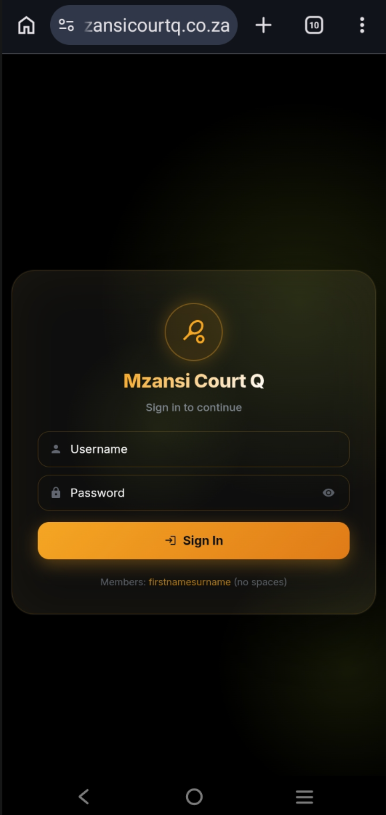
Follow these steps to sign in to your member portal for the first time. When you register on the club site, a temporary password lands in your inbox straight away — no separate request needed.
Open Google Chrome and visit www.mzansicourtq.co.za ↗. Tap the three dots in the top-right corner of the browser to open the menu.
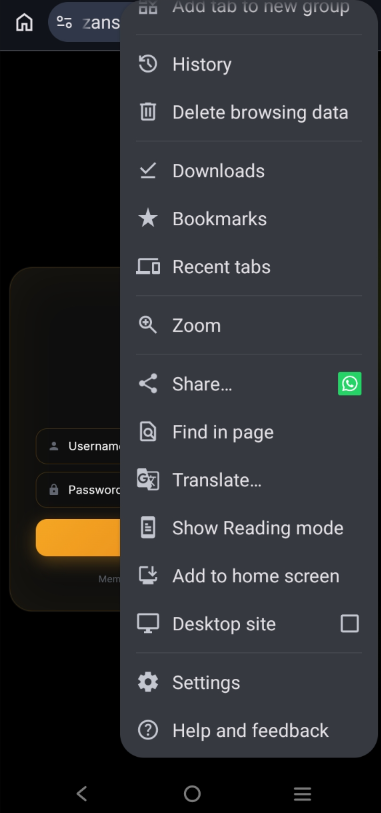
Scroll down the menu and tap Add to home screen. This installs Mzansi Court Q as an app on your phone so you can open it directly from your home screen.
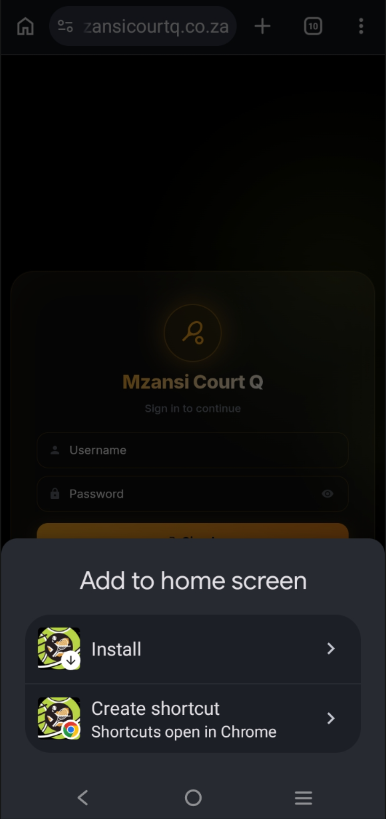
A confirmation card slides up. Tap Install to add the Mzansi Court Q app to your home screen. You can then close the browser and open the new app icon from your home screen.
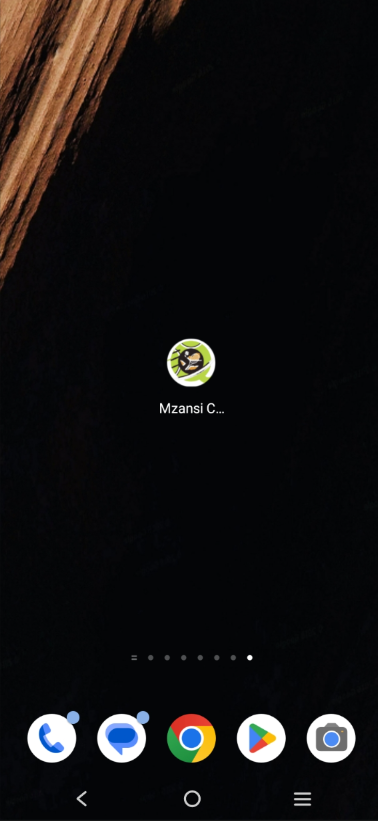
Wait about 30 seconds for the app to install. The Mzansi Court Q icon will appear on your home screen — you can long-press to drag it wherever you like. Tap the icon to open the app.
Open Safari and visit www.mzansicourtq.co.za ↗. Tap the Share button in the bottom bar (the square with an up-arrow).
The Share sheet slides up from the bottom. Scroll down until you see Add to Home Screen and tap it.
A preview shows the app name and icon. Tap Add in the top-right — the icon lands on your home screen and Safari closes the share sheet.
Close Safari and find the Mzansi Court Q icon on your home screen. Tap it to open the member portal — from here on it behaves like any other app.
First time joining? Head to www.mzansicourtq.co.za ↗, pick your membership, and fill in your name, email and phone number. Tap Proceed to Payment (free memberships skip payment). Within seconds a temporary password lands in your inbox — no need to tap "Forgot password" anywhere.
Create your member account to get started.
Free tiers activate immediately — no card needed.
Open your inbox — you'll find a Welcome email from your club with a 6-character temporary password valid for 24 hours. Copy or memorise it — you'll use it once, then set your own password on first login.
Hi Ace,
Your your club member account is ready. Use the temp password below to log in — you'll pick your own password on first login.
Valid for 24 hours. If you didn't sign up, please contact the club.
Back on the sign-in screen, type the 6-character password from the email into the Password field, then tap Sign In.
Sign in to continue
Members: use your email address
Forgot password? Request a temporary oneOn first sign-in you'll see the club disclaimer. Read it through, tick I have read and agree to the above terms, then tap Accept & Continue.
Welcome to your club — managed via Mzansi Court Q, your member portal for court lighting, bookings, and club communications.
your club and the local municipality cannot be held responsible for any injury, theft of personal items, or damage to or theft of motor vehicles.
All City parks and facilities are used at your own risk.
All rules must be obeyed, and any reasonable request by an official on duty must be complied with.
Misbehavior can result in offenders being barred from facilities.
By registering, you consent to receive WhatsApp messages from your club for account verification and important club updates. Your information is used solely for club management and will not be shared with third parties.
Decline & Exit
You'll be prompted to create a personal password. Pick something
strong — at least 6 characters, mixing
uppercase, lowercase, a
number and a special character
(for example Tennis@2026!). Type the same password into
both fields, then tap Set Password & Enter.
Please create a password for your Member Portal account.
Next up: verify your number. The portal shows an
Open WhatsApp button. Tap it — it opens
WhatsApp with a chat to Ace (our bot) with
"verify" already typed. Just tap send.
No codes to type, no OTP to wait for. Ace matches your phone
number against your profile and confirms in the same chat.
No WhatsApp? Tap the small Prefer email? link under the Verify button. We'll email a 6-digit code to your account address — type it in and you're verified. Code expires after 15 minutes; you can request a new one every 20 minutes.
Send Ace a WhatsApp to confirm — no codes to type.
The link opens a chat with Ace (+27 66 049 2460) with "verify" pre-filled — just hit send.
Send the "verify" message. Within a second or two Ace matches your phone number to your profile, marks you verified silently, and replies with a friendly greeting. Head back to the portal — the verify screen updates automatically to the next step.
Add +27 66 049 2460 ↗ to your phone contacts as Ace — that way any reply from Ace shows up with a friendly name in your chat list.
Ace can also answer general club questions — court rates, upcoming events, coaching info, membership queries — just DM at any time.
Finally, fill out your Profile. You'll need to complete the required fields — Date of Birth, Gender, Skill Level and Preferred Hand — and scroll down to tap Save Changes. Once your profile is complete, you'll have full access to the dashboard and the rest of the app.
Welcome to Mzansi Court Q — enjoy the app. Need more help? Reach out to your club committee or contact us at mzansicourtq@gmail.com.